
Identity, authorization and the edge: three layers of one boundary
15 min read15 sections
Securing a self-hosted RAG platform is not the job of a single middleware. It lives in three separate decisions: who the caller is, which resources that caller may touch, and how much traffic the edge lets through.
In this post
- Three different questions, three different layers
- Do not let the application decide identity on its own
- Authorization Code and PKCE: why an intercepted code cannot be reused
- Configuring the login flow in Keycloak
- Role mapping and live membership
- Machine API keys: when another system calls in
- Different rate limits per route
- The trap of local rate limiting across many instances
- Limiting at the application layer: per tenant:user
- Quarantining uploads with ClamAV
- Why the scanner socket must stay on the internal network
- Internal gRPC over mTLS and JWT rotation
- Monitoring is optional, and it must bind loopback
- The responsibility boundary: what belongs to the operator
- In summary
Three different questions, three different layers
A self-hosted RAG system answers three different security questions, and they do not live on the same layer. The first: who are you. The second: what may you do with which resource. The third: how many requests may you send in a window of time. Folding all three into one place is the fastest way to let a small bug on one layer open a large hole on another.
OpenVie splits them three ways. The application layer, running Spring, decides identity and authorization from OIDC tokens and live membership. The edge layer, Apache APISIX, decides inbound traffic: which route may be called, how many requests per second, which headers are blocked. The internal layer, gRPC, decides which channel may call which service and whether that channel uses mTLS. None of the three replaces another. Each catches a different class of mistake.
- Identity: who is calling — a user through SSO, a legacy password account, or an
ovk_machine key. - Authorization: what the caller may read, write or approve, and inside which tenant.
- Traffic: how many requests the caller may send, and who answers when the limit is crossed.
Do not let the application decide identity on its own
The surest way to ship an identity hole is to hand-roll the login flow. Passwords, sessions, cookies, password reset, secret keys — each is its own attack surface, and each patch means re-verifying the whole path yourself. OpenVie pushes that work to Keycloak over OIDC, while Spring acts as a resource server: it receives an access token, checks it before handling the request, and answers within the authority that token carries.
That does not mean a role inside the IdP automatically becomes a permission in the system. IdP roles map onto exactly three OpenVie roles: ORG_OWNER, WORKSPACE_ADMIN, MEMBER. Legacy password accounts keep working, so you can move to SSO gradually without cutting anyone off mid-migration.
Authorization Code and PKCE: why an intercepted code cannot be reused
The Authorization Code grant type sends the user agent to Keycloak. The user signs in there, Keycloak returns a short-lived authorization code, and the application exchanges that code for tokens. Tokens never travel through the address bar. That is why web apps use this flow instead of the older implicit flow.
But an authorization code can still be intercepted in transit: proxy logs, browser history, a hijacked redirect URI. PKCE, defined by RFC 7636, handles exactly that case. The application generates a random code_verifier, hashes it with S256 into a code_challenge, and sends the challenge with the authorization request. When redeeming the code for a token, the application must send the original verifier. An attacker who holds the code but not the verifier cannot trade it for a token.
PKCE matters most for public clients — apps that cannot keep a client secret, such as a SPA or an app running on a user's machine. For confidential clients it is still nearly free extra cover. OpenVie uses Authorization Code with PKCE S256 for SSO.
- The application creates a
code_verifier, hashes it to acode_challengewith S256, and sends it with the authorization request. - Keycloak authenticates the user and returns an authorization code to the registered redirect URI.
- The application redeems the code for a token, sending the original
code_verifier. - Keycloak hashes the verifier and compares it with the stored challenge; a mismatch means no token.
Configuring the login flow in Keycloak
The login flow is not a black box. In Keycloak, the browser flow is an ordered chain of steps, and each step is a choice you should understand before turning it on. The screenshot below is the admin console for that flow, taken from the Keycloak source repository.
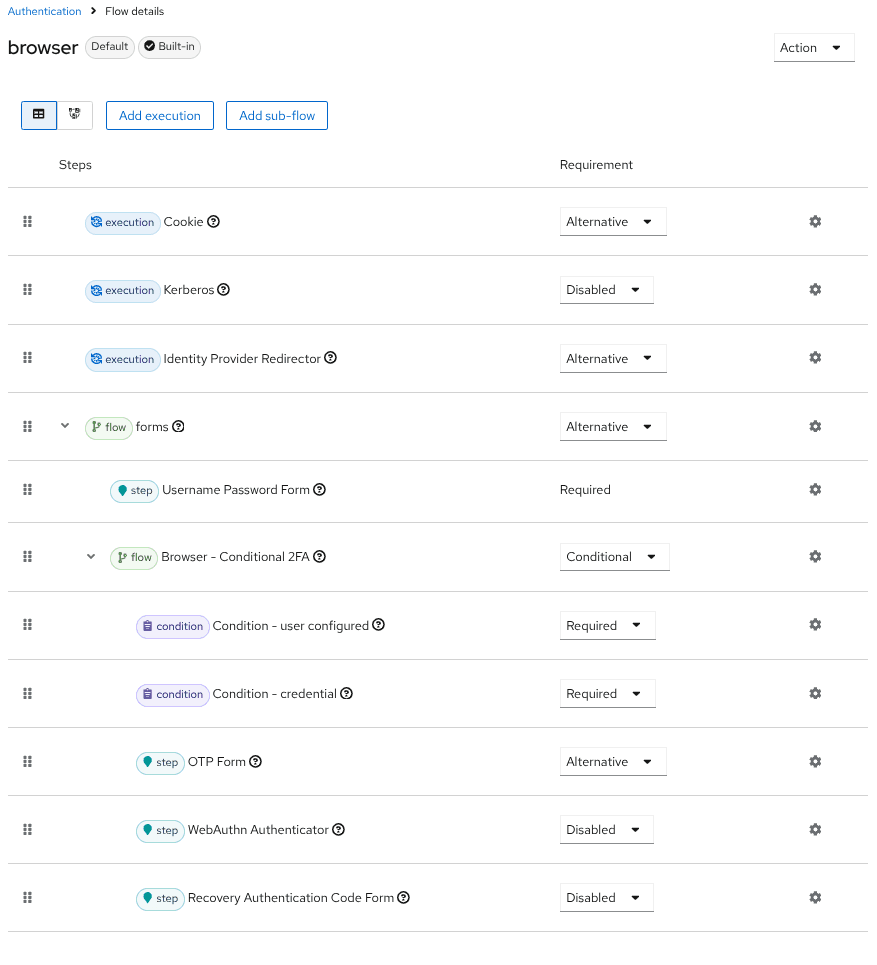
The browser flow in Keycloak: session cookie, IdP redirector, login form, then a conditional 2FA branch. The order of the steps is the login policy.
Four components in the picture are worth naming. The session cookie holds login state across redirects. The identity provider redirector lets you hand users to an external IdP when the organization already has one. The login form is where the password is entered, and where you attach extra checks. The conditional 2FA branch runs only when its condition holds, with OTP or WebAuthn.
- Session cookie: carries the session across redirect steps; it is not where permissions live.
- IdP redirector: links identity from another system without changing the application side of the flow.
- Login form: the main password surface; put retry limits and error-message rules here.
- Conditional 2FA: adds OTP or WebAuthn for the group that needs a higher assurance level.
Role mapping and live membership
OpenVie's three roles are ORG_OWNER, WORKSPACE_ADMIN, MEMBER. They are narrow enough that an operator can explain them, and wide enough that no new role is needed per feature. When the IdP returns a set of roles, the system maps that set onto these three; the rest does not arrive as implicit permission.
Mapping is only the first step. Real authority also depends on membership: which tenant and workspace a user belongs to, and which role they hold there. OpenVie derives the role from live membership on every request instead of copying it into a token and trusting it. If someone is removed from a workspace, the next request already lacks the permission rather than waiting for a token to expire.
The pairing rule: never trust a tenant header. A header sent by the client is a hint, not evidence. The tenant must be resolved from an authenticated identity and a membership read from the database. At the data layer, Qdrant and Kuzu always filter by tenant, so a query that forgets the filter cannot quietly return another organization's data.
Machine API keys: when another system calls in
Not all traffic comes from a person at a screen. Sync scripts, internal pipelines, and an organization's integrations need to call the API without a login session. OpenVie issues machine keys with the ovk_ prefix. Such a key authenticates as a service member with live membership, and follows the same RBAC and tenancy as a regular user.
That means a machine key is not a system-wide pass. It belongs to a tenant, it has a role, and it loses authority when its membership is removed — exactly like an account. You do not need a second authorization model for machines, and there is no separate code path that gets skipped during a permission check.
- One key per purpose: keep the document-sync key apart from the reporting-read key.
- Revoke by removing membership, not by waiting for the key to expire.
- Never bake keys into source or logs; the calling service's environment is the floor.
Different rate limits per route
One limit for every route is the wrong limit. Login takes brute-force password attempts, so it needs to be tight. Reading documents for the UI needs more room. OpenVie sets limits at the APISIX edge with the limit-req plugin and a leaky bucket: rate is requests per second, burst is how many extra requests may queue each second; exceeding both means rejection.
# Apache APISIX — limit-req plugin, leaky bucket algorithm# /api/v1/auth/** rate: 5 r/s key: remote_addr# /api/v1/admin/** rate: 20 r/s key: consumer_name# /api/v1/** rate: 50 r/s key: consumer_name# rejected_code: defaults to 503 — set 429 for standard HTTP semantics# nodelay: true — requests within the burst allowance are not delayed# policy: redis — shared counters, so the limit does not multiply per instanceTwo parameters decide the experience. rejected_code defaults to 503, but 503 tells a client the service is broken, when the truth is that the client is sending too fast. Setting it to 429 makes clients and retry libraries read the situation correctly. nodelay decides whether requests inside the burst allowance are handled immediately or held back; for an interactive API, immediate handling is usually the right call over deliberate slowdown.
The edge also filters URIs and sets security headers: X-Content-Type-Options: nosniff, X-Frame-Options: SAMEORIGIN, and HSTS. These are cheap, done once in one place, and should not be repeated in every controller.
The trap of local rate limiting across many instances
APISIX lets you choose a policy. With local, each instance keeps its own counters in memory. One instance is fine. Several instances behind a load balancer means the effective limit is roughly rate times the number of instances, because each instance counts on its own. You configure 50 requests per second, but the system actually accepts more than that.
This is a silent configuration bug. No warning, no log — only a limit that widens exactly when you scale out. With redis or redis-cluster, instances share the limit through Redis, so the number you set is the number for the whole system.
Limiting at the application layer: per tenant:user
The edge limit counts by IP or by consumer, but it does not know that one user is calling through several paths, or that a tenant has many active members. The application layer adds a distributed limit keyed on the tenant:user pair, stored in Redis, at a default of 600 requests per minute. Crossing the limit returns 429 with Retry-After.
# 600 requests/min per tenant:user pair — counter in Redis# over the limit: 429 + Retry-After# kill switch: disable the limit by configuration when investigating an incidentCounting by the tenant and user pair is deliberate. Counting by user alone would make someone who belongs to two tenants spend from one shared budget. Counting by tenant alone would let a single member burn the whole organization's budget. The pair keeps both dimensions separate and still lets you set a per-tenant limit when you need one.
The kill switch is the least discussed part and the one you need. During an incident you want to turn the limit off quickly to rule it out as the cause, then turn it back on. A limit you cannot switch off is a limit you will not dare to set tightly.
Quarantining uploads with ClamAV
Uploads are untrusted data going straight into a processing pipeline. OpenVie scans the byte stream at the edge with ClamAV, using the INSTREAM command to send content over the socket to clamd, and quarantines anything it flags before it reaches the document ingestion path.
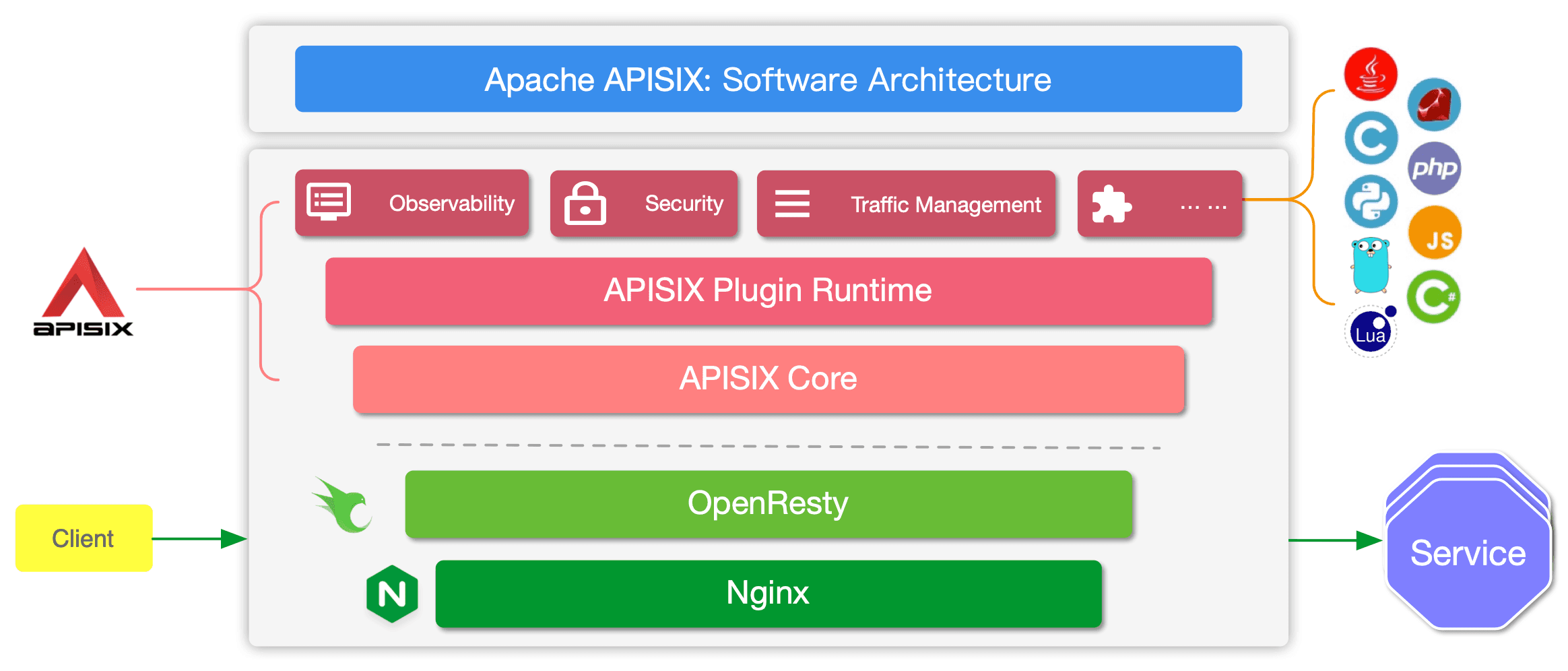
APISIX groups plugins into observability, security and traffic management on one core. File quarantine is a step in that chain, not a service standing on its own.
The clamd protocol is not complex, but a few details are easy to get wrong. INSTREAM sends file content over the socket itself. Each chunk starts with a 4-byte length in big-endian order, followed by the data; the stream ends with a zero-length chunk. The total size is capped by StreamMaxLength in clamd.conf; exceeding it returns INSTREAM size limit exceeded. The result is a line such as stream: OK or stream: <signature name> FOUND.
- Open a connection to clamd and send
zINSTREAM\0using the NUL framing. - Write each chunk: 4 big-endian length bytes, then exactly that many data bytes.
- End with a zero-length chunk so clamd knows the stream is finished.
- Read the result line:
OKlets it through,FOUNDquarantines it and records the event.
StreamMaxLength is a boundary you must match to the application's upload limit. OpenVie accepts 20 MB per file by default; if clamd is set lower, a valid file is rejected at the scan step with an error that looks like a system fault. Set much higher, and you hold a long stream in memory that nobody asked for.
Why the scanner socket must stay on the internal network
ClamAV supports INSTREAM over a TCP socket, but that socket is neither encrypted nor authenticated. Anyone who can connect can send a file to be scanned, and the file crosses the wire in the clear. The ClamAV documentation is explicit: do not expose the TCP socket to an untrusted network. So clamd listens only on the internal network, and no route leads into it from outside.
If you run clamd on the same host, a Unix socket is the better choice: it does not cross the network, and it additionally enables the FILDES command — which works only on a Unix socket. With a Unix socket, access is governed by filesystem permissions, a far simpler model than firewalling a local process.
Internal gRPC over mTLS and JWT rotation
Internal services do not pass through the edge. If someone gets onto the internal network, they can call a service directly and bypass every check at the boundary. So the production profile enables mTLS for internal gRPC: both sides present certificates, and a service without a valid certificate cannot establish a channel.
Tokens do not live forever either. JWTs rotate, so a leaked token is valuable only inside a short window. More importantly, the role is not frozen into the token: every request derives the role from live membership. The token answers who the caller is; the database answers whether that caller still has the authority.
- mTLS on every internal gRPC channel in the production profile.
- Rotating JWTs; no permanent signing key in use.
- Role read from live membership per request, not from a header or a stale copy.
- Never trust a tenant header from any source, including internal services.
The cost of mTLS is certificate operations: issuance, distribution, and rotation before expiry. That is real work, not a one-line setting. But compared to trusting every process on the same network, it is a reasonable trade for a system that holds many tenants' data.
Monitoring is optional, and it must bind loopback
Prometheus, Alertmanager and Grafana live in the monitoring profile and are off by default. That is deliberate: a monitoring stack that switches itself on adds ports, services, and attack surface for people who do not yet need it. When enabled, the profile provisions two dashboards so you start from a working view instead of an empty screen.
- The
monitoringprofile is optional; enable it when you actually have someone on call. - Two dashboards are provisioned, not assembled by hand from scratch.
- Monitoring ports bind loopback: only that host can reach them.
- To view from elsewhere, go through an SSH tunnel or an authenticated reverse proxy; do not open the port outward.
Monitoring does not replace access control. It shows who the limits are stopping, where 429s appear, and whether clamd is returning errors. But if nobody reads the dashboards, turning it on only adds a background process.
The responsibility boundary: what belongs to the operator
OpenVie is self-hosted software under Apache License 2.0. You run it, you own the environment, and some work sits outside the source tree. TLS termination and WAF at the edge belong to the operator. Certificates, cipher suites, WAF rules, and geo blocking — none of those are decided by this repository.
- TLS termination and WAF at the edge: your choice, your configuration, your responsibility.
- Backup schedule and disaster-recovery drills: the scripts exist, the schedule is yours.
- Verifying hardening in your own environment: source code is not evidence of a running production service.
- External provider choices: if you point at an OpenAI-compatible endpoint, tenant content snippets cross that provider's boundary.
This list is not a way to pass work along. It is an honest boundary: a repository can ship mTLS, ClamAV and rate limits, but it cannot know who issued your certificates or what your WAF blocks. Stating the boundary clearly tells you which parts you must verify before opening the system to real users.
In summary
Three questions, three layers. Keycloak answers who is calling, with Authorization Code and PKCE S256 so an intercepted code cannot be reused. Spring answers what that caller may do, from three roles and live membership, with no trust in a tenant header. APISIX answers how much traffic may pass, per route at the edge and per tenant:user pair at the application layer. ClamAV and mTLS close the rest: inbound data carries no malware, and internal channels stay closed to unknown processes.
Security is not one thick layer. It is three thin layers, each answering exactly one question, and none of them trusting another to check on its behalf.
No configuration is right for every environment. Limits, scan thresholds, and 2FA policy depend on your load and your risk. Verify each layer in your own environment before you open the door.