
Two-level approval on BPMN: process control from diagram to audit
10 min read13 sections
Once approval spans two levels with deadlines and escalation, a single `status` column starts leaking business logic into every corner of the code. This piece walks through how OpenVie puts the process on an embedded BPMN engine, writes decisions to the document state, and turns every step into an event you can verify.
In this post
- Why one status column cannot describe the business
- BPMN: describing a process as a diagram of nodes and transitions
- Embedding the engine in the existing runtime instead of building a platform
- The ACT_* tables and where the decision is written
- Timer events: the mechanism behind reminders and escalation
- History and audit: what the engine records, and at which level
- Two approval levels and two different roles
- Preventing self-approval
- Decisions written straight to document state and emitting events
- The workflow.* webhooks and the outbox
- Notifications and per-organization SLA configuration
- Backups that cover both the state table and the engine table
- A checklist when designing a process
Why one status column cannot describe the business
Most document systems start with a status column holding a few values: draft, pending, approved. For a single-person, single-step flow, that is enough. But approval work rarely stops there. The author is not the approver, the first level differs from the second, and someone always owns the blame when a deadline slips.
A status column answers only "where is the document now". It does not answer "who holds it", "for how long", "what is the next step", or "what happens if nobody acts". When you cram those questions into extra columns, into frontmatter, or into a side table, you are hand-building a process engine — you just are not calling it that.
- The current status does not say who owns the next step.
- There is no natural home for a deadline and for what happens when it passes.
- The change history is usually lost, or only the last line survives.
- Every state transition is scattered across application code, hard to verify.
- There is no formal model to reconcile the business design with the running code.
Once those questions show up, you need something that describes the whole process, not just the end state. That is why OpenVie puts two-level approval on a BPMN engine instead of patching another column onto the document table.
BPMN: describing a process as a diagram of nodes and transitions
BPMN 2.0 is a notation that describes a process through nodes (events, tasks) and transitions (the flows between them). Instead of scattering state-transition logic through code, you draw the process and let the engine run that diagram. The diagram becomes the shared source of truth for both the business designer and the person reading the code.
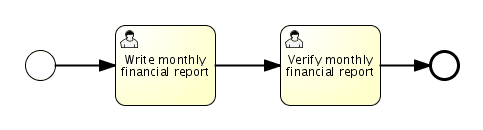
A BPMN example shipped by Flowable itself: a start event, two sequential user tasks, and an end event. OpenVie maps these two approval steps to two different roles — the write step to the WORKSPACE_ADMIN role, the verify step to the ORG_OWNER role.
Image: Flowable (flowable/flowable-engine) · Apache License 2.0
The engine is Flowable — a lean BPMN/BPM engine that runs as a library inside a Java application rather than having to be a standalone platform. The project describes it as a process platform for developers, system administrators, and business users, so one diagram serves three different reading audiences.
A process you can verify is a process you can draw, not a process buried across hundreds of conditional statements.
Embedding the engine in the existing runtime instead of building a platform
OpenVie embeds the Flowable BPMN engine right inside the main API runtime. There is no separate process service to operate, no second database just for workflow, and no broker in the middle only to bridge two systems. One process, one connection, one deployment lifecycle.
The trade-off is clear and real. The engine shares a process with the API, so a bad process definition can affect the rest of it. You also inherit that process's resource ceiling. In return, you never have to keep two systems in sync, and a document state change does not need an internal network call to update the engine.
# the document process identityworkflow_id: approval/v1/document-review # Flowable engine tables live in the same PostgreSQL as application dataACT_RE_* # process definitions and resourcesACT_RU_* # running entitiesACT_HI_* # history # approval state the application reads directlydocuments.approval_statusThe ACT_* tables and where the decision is written
Engine tables carry the ACT_ prefix. The definition group holds the process model, the runtime group holds entities still running, and the history group holds completed traces. Because these tables sit in the same PostgreSQL as application data, you can query the process with the same tooling you use for everything else.
The crucial part is the separation of responsibilities. The engine holds the state machine: which node is waiting, who must act, what comes next. The application holds the business truth where a client can read it. An approval decision is not buried in an engine table; it is written straight to the document's approval_status.
Timer events: the mechanism behind reminders and escalation
Reminders and escalation are not a hand-written cron job. They are timer events in the process. Per Flowable's documentation, a timer can be a start event, an intermediate catching event, or a boundary event; the behavior depends on the business calendar in use, and a timer definition can name its own business calendar. The duration attribute uses the ISO 8601 format required by BPMN 2.0, and a timer definition must have exactly one element.
For OpenVie, that means the "remind after 24 hours" and "escalate after 48 hours" milestones attach directly to the waiting node. When a deadline passes, the engine itself advances the step, not some periodic scanner guessing who is late.
History and audit: what the engine records, and at which level
The engine has history entities such as HistoricActivityInstance — one execution of an activity — and HistoricDetail. This is where the question "who did what, when" gets answered, instead of only knowing the end state. The history level is configurable through the HistoryLevel enum.
Worth noting is the none level: it drops all history storage. That is the fastest setting, but in exchange you have no history information left at all. Because approval is work that needs tracing, OpenVie needs the audit level — enough to reconstruct who approved which step.
Two approval levels and two different roles
OpenVie runs two-level approval on the Flowable engine embedded in the main API runtime. The first level belongs to the WORKSPACE_ADMIN role, the second to the ORG_OWNER role. Both sit inside the system's three-role model: ORG_OWNER, WORKSPACE_ADMIN, MEMBER.
Splitting the two levels is not just two button presses. It separates responsibility: the workspace admin knows the working context, while the organization owner owns the final call. Because both levels map to real roles, approval rights are not a loose flag you have to sync by hand.
- Level one —
WORKSPACE_ADMINreviews the document and makes the first decision. - Level two —
ORG_OWNERconfirms or rejects on top of the first level's result. - Only when both levels agree does the decision complete and the document move to the approved state.
Preventing self-approval
A two-level process is meaningless if the author approves their own document. OpenVie blocks self-approval at the process layer: whoever started the flow or approved a step cannot be the approver of the next step when the two roles would collide. The check lives in the engine, not in whether the interface happens to hide a button.
This is a structural check, not a judgment model. It does not try to infer intent; it just refuses a transition when the acting identity breaks the constraint. As a result, one document cannot run through both levels under a single identity.
Decisions written straight to document state and emitting events
When a step is decided, the result is written straight to the document's approval_status. Clients read the approval state from the place they already know, without learning how to query an engine table. In parallel, each step leaves its own audit-log line, so you get both the current state and a per-step trace.
At the same time, the system emits process events: workflow.started, workflow.approved, workflow.rejected, workflow.escalated. The events are not an arbitrary side effect — they are how the rest of the system learns what just happened without re-reading the engine tables.
workflow.started # the process entered the approval waitworkflow.approved # one level agreedworkflow.rejected # one level declinedworkflow.escalated # a timer pushed the step up a levelThe workflow.* webhooks and the outbox
Those events go out as webhooks signed with HMAC-SHA256 so the receiver can verify the sender. The set covers document.status.changed and the workflow.started/approved/rejected/escalated group. Beyond that, the general BPMN engine is exposed at /api/v1/workflow/engine, and the project ships a Postman collection for quick trials.
Webhooks are not fire-and-forget. The system uses an outbox: the event is recorded first, then a sender retries it a bounded number of times. When the attempt count crosses the threshold, the record moves to DEAD instead of retrying forever. You can see what has not gone out instead of only noticing silence.
Notifications and per-organization SLA configuration
Each approval step sends an email notification to whoever must act, so the process does not stall because nobody knows they are being waited on. The default SLA reminds after 24 hours and escalates after 48 hours. Both numbers are configurable per organization, because organizations do not share the same working rhythm.
Per-organization configuration means you do not edit code to change policy. Changing the reminder window for one organization does not touch another. In return, you have to manage that configuration as part of operations, rather than assuming one hard number applies to everyone.
Backups that cover both the state table and the engine table
Because the state table and the engine tables sit in the same PostgreSQL, backup and restore go through one mechanism. OpenVie uses scripts/ops/backup.sh and scripts/ops/restore.sh with SHA-256 verification, plus disaster-recovery drills. The specific schedule belongs to the operator, not to a fixed setting in the product.
The thing to watch is restore ordering. If you restore document data but forget the engine tables, approval_status says one thing while the waiting process says another. A real backup covers both sides in one consistent snapshot.
Document state and process state are a pair. Back up half the pair and after restore you hold two halves that do not match.
A checklist when designing a process
Before putting an approval process into production, walk this list. It does not replace the business design; it only keeps the diagram and the runtime behavior in agreement.
- Does the diagram carry the right number of approval levels, each bound to a real role?
- Does the anti-self-approval constraint apply to every step, not just the first?
- Is the timer event attached to the correct waiting node, with durations in ISO 8601?
- Is the history level enough to reconstruct who approved which step?
- Does every decision write to both
approval_statusand the per-step audit log? - Do
workflow.*events have an outbox and an explicit retry threshold that flips to DEAD? - Are webhooks signed with HMAC-SHA256, and does the receiver actually verify the signature?
- Are the reminder and escalation SLAs configured per organization to match its rhythm?
- Does the backup cover both the state table and the engine tables in one consistent snapshot?
Once all nine answers are in place, you have a process that is describable, runnable, and traceable. That is the whole point of putting approval on an engine instead of a status column.