
A small lakehouse with Parquet and DuckDB
9 min read13 sections
A simple-sounding count question lands exactly on the boundary between OLTP and OLAP. This piece goes from Parquet and folder partitioning to CDC and embedded DuckDB, and to what OpenVie actually does.
In this post
- A simple-sounding operations question: counting approved documents by workspace
- Why you should not run OLAP on a transactional database
- Parquet: columnar storage with metadata (figure)
- Row groups, column chunks, and pages
- Reading only what you need: column pruning and filter pushdown
- Folder partitioning: tenant, year, month
- Pointing DuckDB at Parquet files (code block)
- CDC: the part that turns a database into a lake
- Why writes must be asynchronous and batched
- Self-hosted object storage works the same way
- Lineage and data-quality checks
- Backup, restore, and operational boundaries
- A design checklist
A simple-sounding operations question: counting approved documents by workspace
Someone on the operations team asks a short question: how many approved documents does each workspace have this month? No language model, no retrieval — just a count. But the moment you answer, you realize it is a data problem.
Data serving an application and data serving analysis have different shapes. This question touches four points at once:
- Tenant scope: every workspace belongs to a tenant, and the result must not leak across tenants.
- Volume: the number of documents grows over time, while the answer is only a small table by month.
- Frequency: the question comes back every week, every month, for many workspaces.
- Source: approval state lives in business data, and you want to read it without slowing the application's write path.
Why you should not run OLAP on a transactional database
The PostgreSQL that OpenVie uses for transactions is optimized for the opposite: row-by-row reads and writes, low latency. A monthly count that scans nearly an entire large table is not what it was designed to do often.
- Full-table scans consume CPU and I/O meant for user requests.
- Locks and caches get shared between two different kinds of load.
- Every new analytics metric adds another heavy query to the same machine.
- You cannot scale the analytical side without also scaling the transactional side.
The common split is to copy the data somewhere optimized for reads. Traditionally that is a warehouse; the lighter option is to leave the data in files and read directly from them.
Parquet: columnar storage with metadata (figure)
Parquet is a column-oriented file format: it stores data by column, with metadata per group of columns. The consequence is clear — a query that touches only a few columns does not have to read the rest of the file.
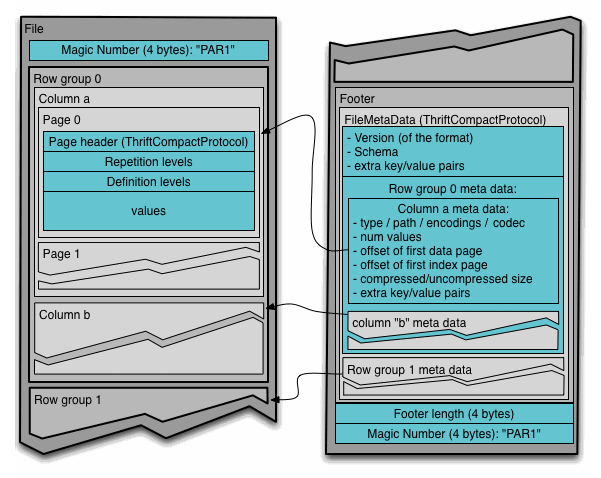
The Parquet file layout from the official format documentation: file → row group → column chunk → page, with the footer holding metadata.
Image: Apache Parquet (apache/parquet-format) · Apache License 2.0
This maps onto the opening question: you need workspace, month, and approval state — three columns. DuckDB reads and writes Parquet directly, with no preload into another database, so you point it straight at the files, as described in the DuckDB Parquet documentation.
Row groups, column chunks, and pages
According to the official format documentation, a Parquet file has a clear hierarchy. Understanding it explains why column pruning and filter pushdown are so effective.
- A file contains multiple row groups, usually tens of thousands of rows each.
- Each row group splits into column chunks, one chunk holding a single column's data.
- Each column chunk is a sequence of pages — the smallest unit the reader works with.
Because a column's data sits contiguously inside its column chunk, reading a few columns is only a small set of reads. Because each row group carries its own statistics, a filter discards an entire row group without touching the data inside — both serve the goal of reading as little as possible.
Reading only what you need: column pruning and filter pushdown
Two techniques account for most of Parquet's read speed. Column pruning reads only the columns a query actually uses. Filter pushdown applies the condition at the file layer to skip data that does not match.
- Column pruning: the reader opens only the column chunks it needs instead of whole rows.
- Filter pushdown: using row group statistics, some row groups are skipped entirely.
- The two together: the data that must be decoded drops sharply before anything is computed.
From the SQL writer's side, you just select the right columns, write WHERE specifically, and let the engine handle the rest. What you must do deliberately is organize data so common filters line up with the file structure — and that is where partitioning comes in.
Folder partitioning: tenant, year, month
Partitioning splits data into many files by the value of a column, then places them in directories whose names reflect that value. DuckDB supports Hive-style partitioning on folder paths, so tenant=acme/year=2026/month=10 becomes part of the filter.
For OpenVie, the three partition columns are clear: tenant, year, month. A query for one tenant in one month only opens that directory. Partitioning by tenant turns the tenant boundary into a folder boundary, consistent with the rest: Qdrant and Kuzu always filter by tenant, and access is decided by the ORG_OWNER, WORKSPACE_ADMIN, and MEMBER roles.
Partitioning does not make a query magically fast. It only shrinks the set of files that must be opened — and that is often the deciding factor.
In exchange, too many small directories make each query open many files and pay more metadata cost. Choosing the partition key is a design decision, not a default. How DuckDB maps directory names to columns is in the Hive partitioning documentation.
Pointing DuckDB at Parquet files (code block)
DuckDB queries Parquet files through a read function right inside SQL. You use a wildcard path to gather many files from one partition directory, and the partition columns are recognized from the directory names.
SELECT workspace_id, month, count(*) AS approved_documentsFROM read_parquet('s3://lakehouse/tenant=acme/year=2026/month=10/*.parquet')WHERE approval_status = 'approved'GROUP BY workspace_id, monthORDER BY workspace_id;The query touches exactly three columns, filters on one, and groups by workspace and month. No loading step happens first: DuckDB reads the Parquet files directly, whether on disk or object storage.
CDC: the part that turns a database into a lake
Reading files is only the second half of the story. The first half is getting data from the transactional database to the lake as Parquet — the job of CDC, change data capture.
In OpenVie, changes from the database go through RabbitMQ and are written as Snappy-compressed Parquet on SeaweedFS S3. The application still writes to PostgreSQL as usual, while a separate stream carries changes out to the lake.
- A change is emitted when business data changes.
- The message travels through RabbitMQ, decoupling the application's write speed from the lake's.
- A writer consumes the messages and produces Snappy-compressed Parquet files.
- Files are placed into tenant, year, month partition directories on SeaweedFS S3.
Datasets are split by domain: chat, audit, document, and workflow. The result is a small but sufficient lake: data in standard Parquet, with embedded DuckDB running analytical SQL over it without loading PostgreSQL.
Why writes must be asynchronous and batched
If every change immediately produced a tiny Parquet file, you would soon have thousands of minuscule files. Each carries metadata and file-open cost that every later query pays.
So the write path is asynchronous and batched: changes are grouped and written as files of a sensible size, and the application is never forced to wait on the lake.
- Asynchronous: the application does not block on the lake's speed.
- Batched: many small changes merge into fewer, larger files.
- Snappy compression: reduces stored size at an acceptable decode cost.
- Partitioning: keeps the number of files per directory reasonable.
This is also the model DuckLake describes: write fast by inserting many small batches, then compact in the background. It accepts that fast writing and efficient reading have different needs — a good platform reconciles both. Details are in the DuckLake architecture article from MotherDuck.
Self-hosted object storage works the same way
A common misconception is that a lakehouse only fits the cloud. It does not: Parquet is a file format, object storage is a read-write interface, and you can run both yourself.
- Standard Parquet works with any system that reads the format, even with files on S3, Azure Blob, GCS, R2, or Tigris.
- The SeaweedFS S3 in OpenVie is self-hosted object storage compatible with the S3 interface.
- Embedded DuckDB runs in-process, needs no separate cluster, and reads files directly.
- You keep control over data location, access keys, and file lifecycle.
In exchange, you handle the infrastructure yourself: access configuration, permissions, backup, monitoring. DuckLake follows the same spirit: bring your own blob storage, keep data in standard Parquet, and let a catalog handle management.
Lineage and data-quality checks
When data flows through several steps, the question shifts from whether the number is right to where this number came from. Data lineage — a lineage DAG — answers by recording the transformation steps and their dependencies.
- Lineage DAG: each dataset knows where it came from and which steps it passed through.
- Data-quality framework: checks run as part of the pipeline, not as manual work.
- Typical checks: missing rows, duplicate rows, values outside a valid domain, unusually empty partitions.
- Check results must be visible; otherwise a check is a step with nobody reading it.
Backup, restore, and operational boundaries
OpenVie ships operational scripts for backup and restore with SHA-256 verification (scripts/ops/backup.sh, restore.sh), along with a disaster-recovery drill. The schedule belongs to the operator: the product gives you the tools, it does not decide when you run them.
- Set the backup frequency from how fast data changes and how much loss you accept.
- Verify a backup with SHA-256 before trusting it.
- Run restore drills regularly, not only after an incident.
- Record who owns each step and the evidence of every run.
The boundary must also be clear: the analytical layer is a read copy, not a replacement for the transactional database.
A design checklist
- Choose partition keys that match your most common question, such as tenant, year, month.
- Keep files at a sensible size; avoid turning the lake into thousands of small files.
- State which datasets use Snappy compression and why.
- Write SQL that selects only the columns you need, so column pruning does its job.
- Push filters down with specific
WHEREconditions of the right type. - Split datasets by domain — chat, audit, document, workflow — when shape and query frequency differ.
- Design the write path to be asynchronous and batched from the start.
- Add data-quality checks to the pipeline, with alerts when a check fails.
- Record lineage so you can trace each number back to its source.
- Set a backup schedule and restore drills, and name who is responsible.
For OpenVie, the answer is a partitioned Parquet lake, written through CDC, read with embedded DuckDB, and subject to the same tenant boundary as the rest of the system. The core is headless: every capability goes through HTTP JSON at /api/v1/**, and the web application is just one reference client. You can keep or replace this approach — as long as you understand its cost.